

Every few weeks we will let you know about the latest free audio plugins. Check those expiry dates because some won’t be free forever. Join the Plugin Deals and Freebies Facebook Group, or check out r/newplugindeals and r/freeaudioplugins on Reddit if you want to find out about the latest deals and freebies as they happen.
4drX Launches Free StereoMixer Plugin for Mac and Windows Users
Expiry: None
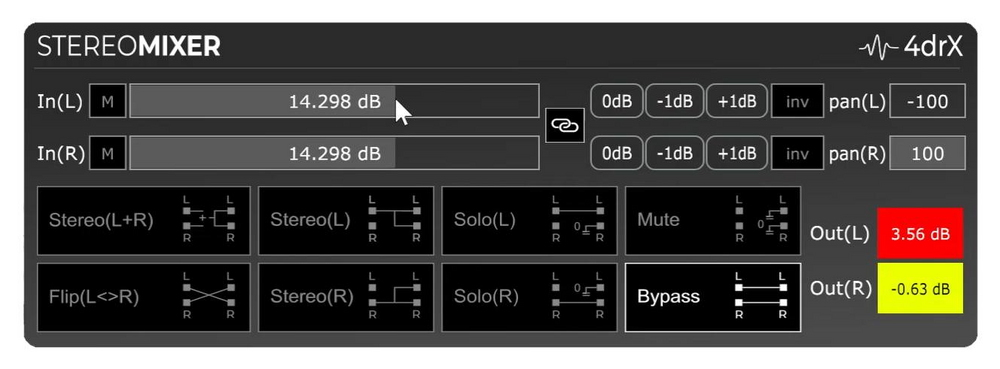
4drX has introduced a new stereo re-panning plugin named StereoMixer, available for both Mac and Windows users. This plugin is designed to offer a straightforward user experience with several key features.
StereoMixer allows for one-click stereo re-panning, facilitated by a touch-friendly gain slider. Users can solo the Left or Right channels of a stereo track without altering the panning settings, which is particularly useful for isolating specific instruments.
The plugin also provides the capability to monitor stereo signals in mono through a simple one-click mix of both Left and Right channels. This feature is advantageous during live performances.
To assist in monitoring audio levels, StereoMixer includes large colored peak meters that help detect audio clipping. Additionally, it offers separate ±48dB gain sliders for the Left and Right channels, allowing for further audio amplification.
Users can flatten a stereo track to mono by selecting either one or a combination of channels. The “INV” buttons enable subtraction of both channels to cancel out mono parts panned to the center, such as bass and drums.
For precise gain adjustments on touch screens, ±1dB buttons are available within the plugin interface.
StereoMixer is currently at version 1.0.0 and supports AAX, VST, and AU formats. It is compatible with Windows 10+ and MacOS 11 Big Sur+. The plugin aims to integrate with various hosts including Cubase, Logic, Ableton Live, Reaper, Bitwig, FL Studio, Studio One, and Cantabile.
23DSP Launches Free Harmonic Distortion Plugin 23HotCold for Win and Mac
Expiry: None
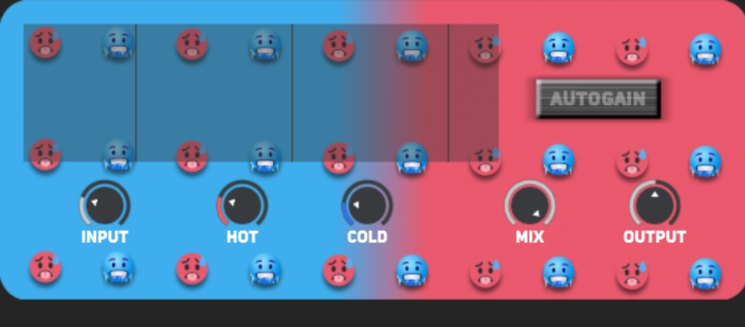
23DSP has released a new harmonic distortion plugin named 23HotCold, available for both Windows and Mac users. This plugin is a simplified version of the MS-23HotCold, providing users with precise control over even and odd harmonic distortion.
The 23HotCold plugin includes several key features. The “Hot” feature focuses on even harmonics, adding rich, musical warmth through asymmetrical saturation. In contrast, the “Cold” feature targets odd harmonics, offering punch and bite with symmetrical distortion.
Users can utilize the Drive & Output controls to push the input signal, shape the tone, and manage final loudness levels. Additionally, a Mix Control option allows blending of the processed signal with the dry signal for either subtle enhancements or full saturation effects.
An Auto Gain feature is included to maintain consistent output levels automatically as distortion settings are adjusted.
Currently in open beta, 23HotCold is available for testing but may not be fully compatible with all OSX versions and Logic Pro due to Apple Gatekeeper restrictions. Users can bypass these restrictions by copying the plugin to the Components path and using a terminal command to adjust settings accordingly.
23DSP Launches Free Analog Tape Emulation Plugin 23Tape for Windows and Mac
Expiry: None
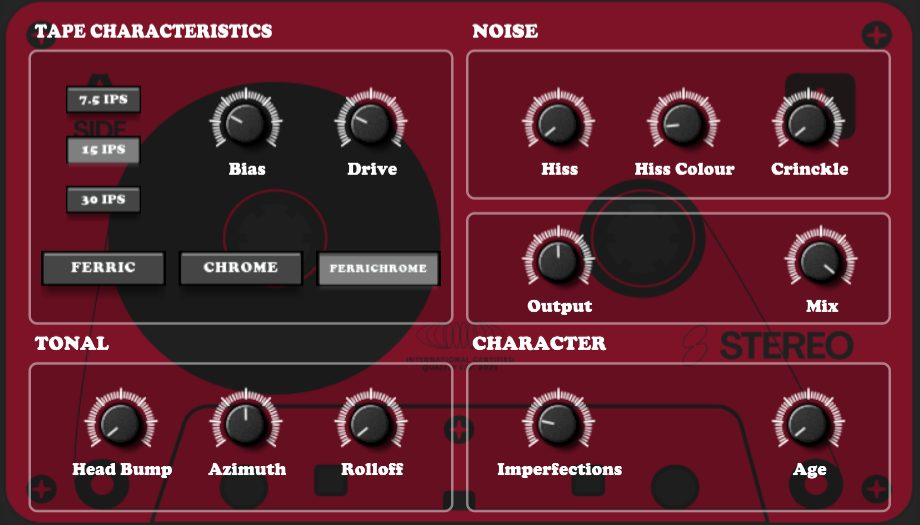
23DSP has introduced a new plugin named 23Tape, an analog tape emulation tool available for both Windows and Mac platforms. The plugin is offered on a “name your price” basis, starting at €0, allowing users to decide how much they wish to pay. It is currently in stock and can be downloaded for use.
The 23Tape plugin features a Hysteresis Engine that captures the nonlinear memory of magnetic tape through a feedback-based model. This model reacts to drive and bias settings, providing users with the ability to simulate classic tape speeds of 7.5, 15, or 30 inches per second (IPS). Users have full control over bias and input drive settings for tone-shaping and saturation purposes.
Additional features include noise and crinkle layers that allow users to add hiss, color it, introduce crinkle artifacts, or dial in mechanical scrape flutter for authentic imperfections. The tonal shaping section offers options such as head bump, azimuth misalignment, high-frequency rolloff, and stereo output level adjustments.
The plugin also includes age and randomization features that simulate tape wear and chaotic real-world conditions. This allows users to recreate effects ranging from brand-new reels to vintage cassettes exposed to sunlight over time. Deep compression modeling is another feature of the plugin; bias and tape type affect the soft-knee dynamic response, simulating the warmth and squish characteristic of overdriven reels.
Designed for high-fidelity analog tape emulation, 23Tape aims to smooth out digital harshness, warm up drum sounds, or create nostalgic audio effects. The technical foundation of the plugin is built in FAUST (Functional Audio Stream) language and powered by a deep DSP (Digital Signal Processing) architecture.
Currently in open beta status, the plugin is available but still undergoing testing phases. Users should note compatibility issues due to Apple Gatekeeper restrictions; it may not be compatible with all OSX versions or Logic Pro software at this time. To bypass these restrictions on Apple systems, users can copy the plugin into the Components path and execute a terminal command to enable it.
The Wave Warden Releases Odin 2.4.0 Update for Mac Windows and Linux
Expiry: None
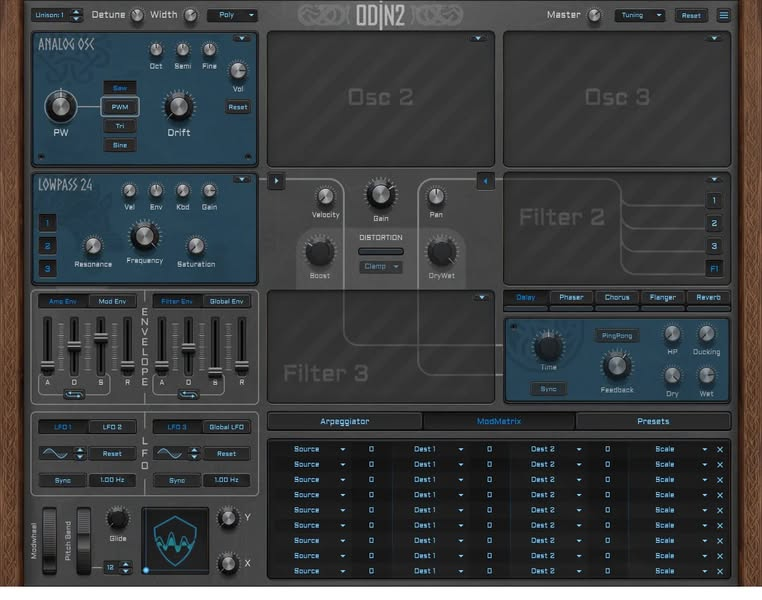
The Wave Warden has announced an update of the Odin 2 synthesizer version 2.4.0, now available for download on multiple platforms including Windows, macOS, and Linux. This update continues to support a range of plugin formats such as VST3, AU, CLAP, and LV2.
Odin 2 is a 24-voice polyphonic synthesizer designed to produce a variety of sounds including basses, leads, and effects. It features custom waveform drawing capabilities and emulates well-known analog filters like the Moog Ladder and Korg 35. The synthesizer also includes five onboard effects and offers extensive modulation options.
The user interface for Odin 2 is available for viewing through an image provided by The Wave Warden. As an open-source project, the source code for Odin 2 can be accessed on GitHub.
Darkpalace Studio Launches Free Stereo Enhancer Plugin Tiny-Caterpillar for Win Mac and Linux
Expiry: None
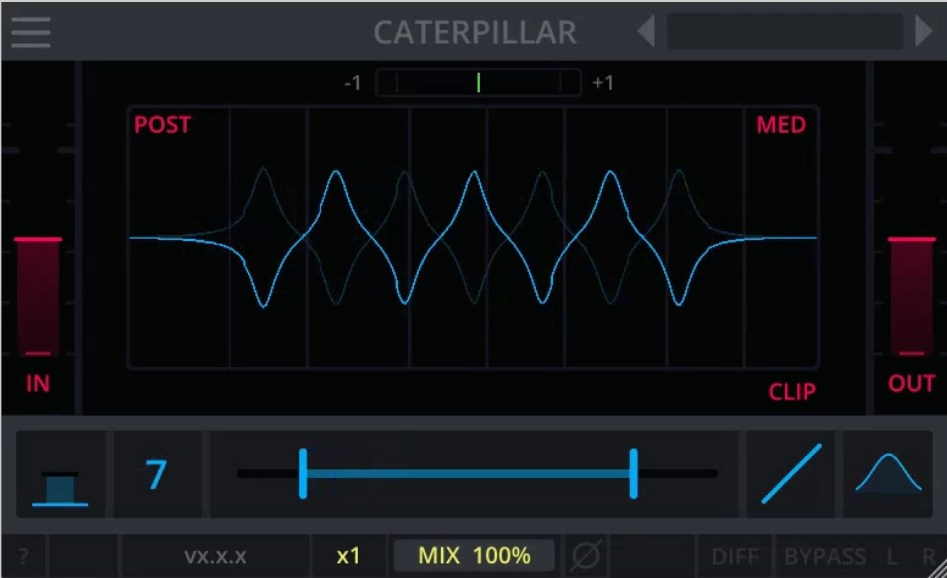
Darkpalace Studio has released a new stereo enhancer plugin named Tiny-Caterpillar. This plugin is available for free and supports multiple operating systems, including Windows 10 and 11, Ubuntu 22.04 or higher, and macOS 13 and above. It is compatible with several plugin formats such as VST3, Audio-Unit (AU), LV2, and CLAP.
Tiny-Caterpillar is currently at version 1.0.1 and offers a range of features aimed at enhancing stereo sound without compromising mono images. One of its key features is the Spread EQ, which allows users to add stereo-width effectively. The plugin also provides full control over delta/difference settings, dry/wet mix adjustments, bypass options, and polarity switching.
The plugin’s interface is rendered using OpenGL on the GPU to ensure efficient CPU usage. Users can benefit from its resizable and responsive design with customizable themes. For those who wish to tailor the plugin further, an editable JSON configuration file is available for parameter customization.
A high-quality manual accompanies Tiny-Caterpillar to guide users through its functionalities in detail. Additionally, audio demos are accessible for users to experience the plugin’s capabilities firsthand. These demos include samples such as Rhodes, Dry Wet Chill Loop, Dry Wet Funky Loop, Dry Wet Guitar, and Dry Wet A Look for Everyone.
DamyFx Launches Free Bass Amp Sim Plugin HellsBass for Windows
Expiry: None
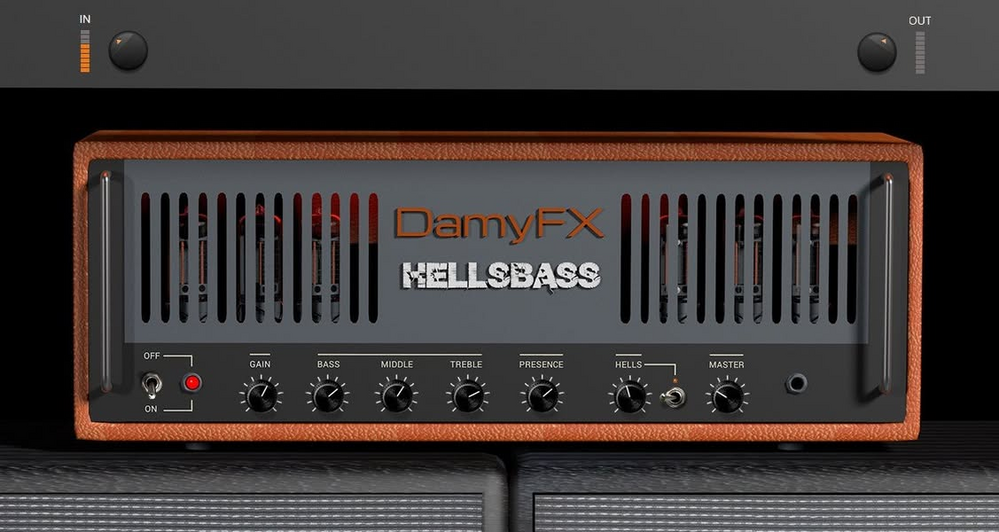
DamyFx has introduced a new plugin, the HellsBass Bass AmpSim, designed for Windows users. This electric bass VST3 plugin serves as an amplifier simulator, offering a robust bass sound suitable for various musical genres. While it is particularly tailored for Rock and Metal sounds, its warm tube sound ensures versatility across different styles.
The HellsBass plugin features an authentic visual design that draws inspiration from iconic bass amplifiers. Users can adjust the sound using the bass, mid, and high EQ sections along with a Presence control. Additionally, there is a dedicated On/Off switch to activate the Overdrive control known as “Hells.”
For gain staging, the plugin includes separate volume and master controls. It aims to deliver a true pure tube amplifier sound that can range from tones reminiscent of Jaco Pastorius to those akin to Pantera.
Beat Launches Free Impulse Responses Pack Nocturna
Expiry: None
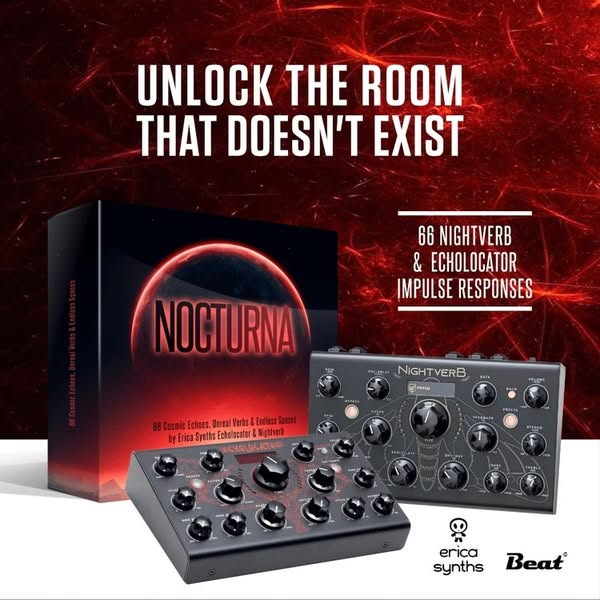
Beat has released a free impulse responses pack named Nocturna, which includes 66 impulse responses derived from the Echolocator and Nightverb effects units. This collection is designed to assist in crafting ethereal soundscapes, adding depth to musical instruments, and exploring experimental sound design.
Nocturna offers a curated selection of sonic textures that capture the distinctive character of the Echolocator and Nightverb units. The pack provides a rich palette of nocturnal atmospheres and non-existent echoes. The sound dynamics include echoes and reverbs that vary in volume, rebuild with sudden noise, and fade with a deep rumble. Shimmer effects contribute crystalline tinkling to beats or octave shifts to synth lines, creating expansive walls of sound.
The features of Nocturna include 33 Echolocator impulse responses. These encompass shimmering delays, modulated echoes, and spacious textures that range from subtle ambience to otherworldly soundscapes. Additionally, there are 33 Nightverb reverb impulse responses characterized by lush, expansive reverbs with long decay tails that are harmonically rich.
The pack also includes the Convology XT effect plug-in for both Windows and macOS platforms. This plug-in is used to load the impulse responses; however, they are also compatible with other IR plug-ins.
Users can utilize these impulse responses in their preferred convolution reverb plugin to enhance drums, vocals, and synths. They can also craft immersive soundscapes suitable for film, games, or music projects. Furthermore, new textures can be created by warping, twisting, and layering these IRs.
Nocturna is available for free download. To access the contents of the pack after downloading it as a zip file, users will need a password. This password corresponds to the number of user slots offered by the Echolocator unit; this information can be found on Erica Synths’ website under the Echolocator product page.
The total file size for Nocturna is 767.9MB.
Austrian Audio Launches Free PolarDesigner V3 Beta Plugin for Windows and Mac
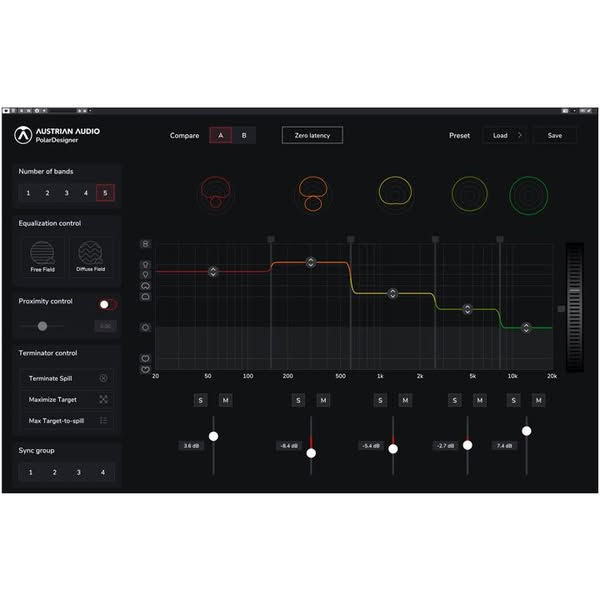
Expiry: NoneAustrian Audio has released the PolarDesigner V3 Beta, a plugin designed for manipulating polar patterns. This software is available for both Windows and Mac platforms and supports AAX, VST3, and AU formats. The plugin is currently offered as a free download.
The plugin is fully optimized for Apple Silicon, including M1 through M4 chips, and also supports Rosetta mode. It features an updated user interface with modern graphics that are simpler and lighter, along with a resizable UI. Performance improvements have been made through updates to the JUCE Framework and cross-platform FFT.
Key features of the PolarDesigner V3 Beta include a Trim Slider for adjusting frequency-dependent polar patterns and new Terminator control heuristics aimed at intuitive usage. Users can store, recall, and share presets easily. The plugin includes a powerful terminator algorithm for frequency and instrument control, EQ control for tonality adjustment, solo/mute options for each band, full automation capabilities, and phase linearity.
The software is optimized for use with OC818 microphones in Dual Output mode but remains compatible with any dual output source. It is particularly useful in busy sessions where instrument pickup tuning during the mix stage is required.
System requirements specify OSX 10.7 or later for Mac users and Windows 7 or later for Windows users.
The PolarDesigner V3 Beta allows users to manipulate recorded audio by changing and recombining polar patterns across up to five frequency bands. This offers engineers and producers enhanced creative freedom and control over their audio projects.
This open-source plugin is specifically optimized for use with OC818 and OC-S10 large-diaphragm condenser microphones when operating in dual-output mode.
Analog Obsession Launches Free EDComp Compressor Plugin for Windows and Mac
Expiry: None
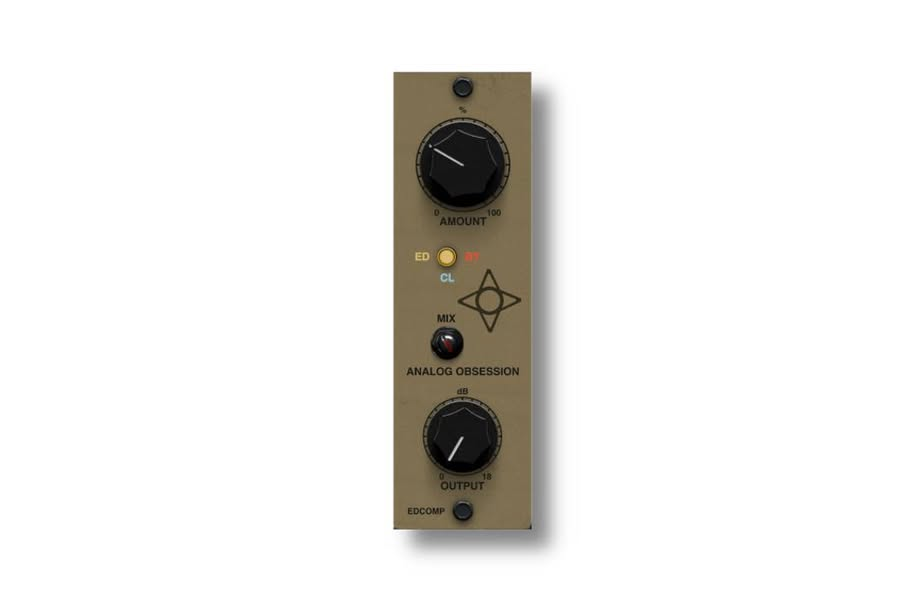
Analog Obsession has released a new compressor plugin named EDComp, available for both Windows and Mac users. The plugin was launched on May 26, 2025, and is currently at version 1.0.
EDComp utilizes pre-emphasis and de-emphasis techniques and includes a ‘CLEAN’ mode. It incorporates an S-Type channel compressor trick with an adjustable ratio and fixed threshold, designed to provide smoother control and improved leveling. In the ED mode, the plugin emphasizes and de-emphasizes low and high frequencies with carefully selected settings, making it particularly suitable for vocal processing but applicable to various audio sources. The CL mode operates without any emphasis or de-emphasis adjustments.
The attack time is set at 15 milliseconds while the release time is fixed at 80 milliseconds. Key features of the EDComp include:
- AMOUNT: Adjusts the level of compression applied.
- BUTTON: Allows selection between modes – ED (Emphasis/De-Emphasis), CL (Clean), and Bypass.
- OUTPUT: Provides a clean output to set the final audio level.
- MIX: Enables blending of processed audio with the dry signal.
- The interface can be resized from 50% to 200% using a “Bottom Right Corner Handle.”
The plugin is available in several formats. For Mac users, it supports VST3, AU, and AAX Native – Audiosuite formats, requiring Mac OS version 10.11 or higher along with Intel or Apple Silicon processors and a graphic card compatible with “Metal.” Windows users can access VST3 and AAX Native – Audiosuite formats; compatibility requires Windows versions 10 or 11 along with a graphic card that supports “OpenGL.”
The interface’s resizable feature allows users to adjust it according to their preference; it is recommended that they save their preferred size as a default preset within their Digital Audio Workstation (DAW) for consistent sizing across new instances of the plugin.
Thanks for reading. We hope you found some cool and useful new tools!
Check out previous FREE Plugins Reports for even more freebies! You can also browse a range of free effects, free instruments, and free studio tools available from our partner Plugin Boutique, so check those out too. For everything else you can find lots of audio plugin deals on this website.