

Every few weeks we will let you know about the latest free audio plugins. Check those expiry dates because some won’t be free forever. Join the Plugin Deals and Freebies Facebook Group, or check out r/newplugindeals and r/freeaudioplugins on Reddit if you want to find out about the latest deals and freebies as they happen.
HoRNet Plugins offers free download of 3XOver plugin
Expiry: February 13th
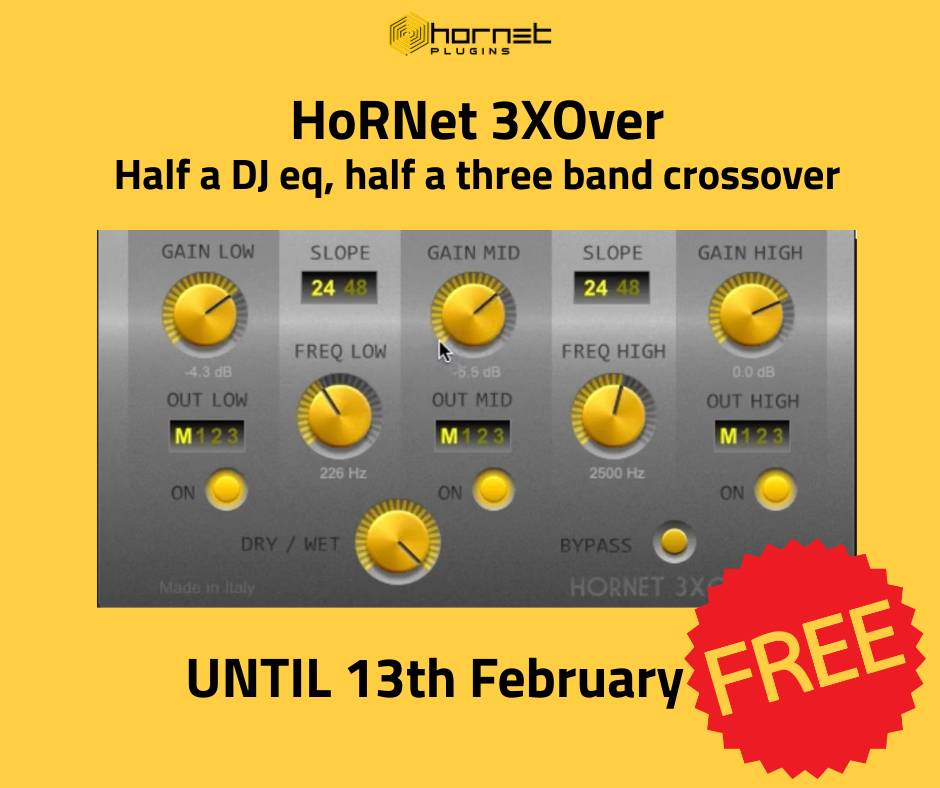
HoRNet has released 3XOver as a free download. The plugin combines a three-band crossover with DJ-style EQ controls, enabling band-splitting and tone shaping within a single processor.
3XOver uses three filters to target distinct ranges: a low-pass section for lows, a band-pass for mids, and a high-pass for highs. Cutoff frequencies for each band are adjustable. Users can choose filter slopes of 24 dB/oct or 48 dB/oct, and each band provides gain control for attenuation or boost. A global dry/wet control is included.
Each band features an on/off switch to quickly mute that frequency range, allowing isolation or “kill” operations during mixing or performance.
The plugin supports multi-output operation with four stereo outputs: a master output and three auxiliary outputs, one per band. This lets users route low, mid, and high bands to separate channels for independent processing such as dynamics, EQ, or effects.
- Formats: Audio Units, VST2.4, VST3
- Operating systems: macOS (10.7 or later) and Windows
- Architecture: 64-bit on macOS and Windows
- Apple Silicon: not supported yet
Multi-output routing depends on host capabilities. While 3XOver adheres to the VST and AU multi-output specifications, some DAWs do not expose secondary outputs for routing. The plugin’s multi-output functions have been tested in hosts that support this feature, including Ableton Live, Cockos Reaper, MOTU Digital Performer, and Avid Pro Tools via a VST wrapper. In hosts without native multi-output support, third-party plugin hosts can be used to route the additional outputs.
Potential uses include:
- Multiband compression by sending each band to separate channels for tailored dynamics
- Parallel processing, such as saturating mids while keeping lows and highs cleaner
- Live EQ workflows where quick band cuts or boosts are needed
- Sound design tasks, from sculpting drum elements to building layered textures
A demo version is available with limitations: periodic silencing, no parameter recall in saved sessions, and no response to host automation.
Parallax by Moonwave FX now free – normally 129 dollars
Expiry: February 26th
Parallax by Moonwave FX is available as a free download for a limited time. The regular price is $129.80. The plugin runs on macOS and Windows in VST3 and AU formats; AAX is not supported. The download includes additional MIDI, loop, and drum content.
Parallax is a dual-engine multi-effect designed for parallel processing. The Reality engine prioritizes transient preservation, harmonic structure, and definition. The Dream engine focuses on time-based movement, evolving textures, and spatial depth.
A central Morph control blends the two engines continuously, allowing automation from controlled, dry processing to broader, more abstract results. Parameter linking coordinates multiple controls during morphing to maintain consistent behavior across the signal path.
- Dual-engine architecture: Reality (transient clarity and harmonic focus) and Dream (evolving, spatial textures)
- Morph control for seamless, continuous blending between engines
- Linked parameters for coordinated changes while morphing
- Phase-coherent stereo width and expansion
- Transient-safe processing to retain initial impact
- Low CPU usage for larger sessions
- Streamlined interface with minimal menu navigation
- Continuous transition between grounded and abstract sound profiles
- Included content: MIDI files, loops, and drum collections
- Formats: VST3, AU; Compatibility: macOS, Windows; No AAX
Typical uses include reinforcing drum transients while adding stereo width, shaping synths for added definition or motion, converting static loops into evolving backdrops, and creating gradual transitions between dry and ambient passages. The morphing workflow also supports automated moves across sections, such as shifting a tight rhythmic element into a wider texture over a bar or phrase.
2B Played Music offers QFX Echo free with code WINTER26
Expiry: February 26th
QFX Echo is a new one-knob delay plugin designed to make professional-quality delay effects fast and accessible. Built around a streamlined interface, it aims to remove the complexity often associated with traditional delay tools while still offering meaningful control.
Despite its minimalist design, QFX Echo includes independent delay time settings for the left and right channels, allowing users to shape a wider, more dynamic stereo image. A built-in high-pass filter further refines the delayed signal, helping tailor the effect for different sources such as male and female vocals, synth leads, and pads.
Targeted at musicians and producers who prefer speed and simplicity, QFX Echo focuses on delivering depth and dimension with minimal setup. The plugin is positioned as a creative tool that lets users dial in polished delay effects quickly, keeping the emphasis on music-making rather than technical adjustments.
The promotion requires entering the code WINTER26 during checkout to reduce the price to zero.
Acon Digital offers Limit limiter plugin as a free download for Mac and Windows
Expiry: March 1st
Acon Digital has released Limit, a limiter plug-in for macOS and Windows, as a free download until March 1, 2026. The offer is limited to one copy per user and applies to the full version of the software.
Limit is designed for controlling peak levels and increasing perceived loudness while preventing signals from exceeding a defined ceiling. It can serve as a final stage in mixing, mastering, and post-production workflows where consistent output levels and delivery compliance are required for streaming, broadcast, and physical formats.
The plug-in is available in VST, VST3, AU, and AAX formats. It supports Windows 10 or later and macOS 10.13 or later, and is compatible with digital audio workstations that host these plug-in types.
Key functions include transparent limiting aimed at preserving dynamics, tone, and detail while achieving competitive loudness. Typical applications include finalizing masters, controlling transients on mix buses, and preparing audio for loudness-normalized platforms.
- Download the installer for macOS or Windows from Acon Digital’s website.
- Run the installer on your computer.
- Load the Limit plug-in in your DAW.
- Click the Redeem button in the plug-in and sign in or create an Acon Digital account when prompted.
- Paste the provided license key into the plug-in to activate.
Limit is also included in Acon Digital’s Mix and Mastering Suite and Acoustica Premium packages.
Noizefield releases free AI powered Audio Plugin Coder for Windows Mac and Linux supporting AU VST3 LV2 and standalone
Expiry: None
Noizefield has released Audio Plugin Coder (APC), a free, open-source framework for developing audio plugins with AI assistance. Licensed under MIT, APC targets Windows, macOS, and Linux and supports VST3 and standalone builds across all three platforms, AU on macOS, and LV2 on Linux. CLAP support is planned.
APC is designed as an agent-agnostic system that works with a range of LLM-based coding agents. It structures the plugin development lifecycle so that DSP, UI, build, state handling, and packaging can be coordinated through repeatable workflows and persistent project context.
Development status: APC is in active development. APIs may change, features may be incomplete, and bugs should be expected. It is intended for development and experimentation until a stable release is announced.
Key features include:
- LLM-driven development with support for popular coding agents.
- Structured five-phase workflow: Dream → Plan → Design → Implement → Ship.
- Two UI approaches: Visage (C++, experimental) and WebView (HTML5 Canvas).
- State management with automatic progress tracking, validation, and rollback.
- Self-improving troubleshooting that records issues and solutions for reuse.
- JUCE 8 with CMake for production-ready builds.
- Pre-built “skills” covering DSP, UI design, testing, and packaging.
The five-phase workflow organizes the process from concept to delivery. Dream captures the creative brief and parameter set. Plan defines architecture, DSP graph, and UI framework. Design produces GUI mockups and iterations. Implement develops DSP and integrates the UI. Ship builds installers and prepares distribution, including testing in compatible DAWs.
Supported plugin formats and targets:
- VST3: Windows, macOS, Linux
- Standalone: Windows, macOS, Linux
- AU: macOS
- LV2: Linux
- CLAP: planned
Typical prerequisites include Windows 11 or Linux, PowerShell 7+, Visual Studio 2022 with C++ tools, CMake 3.22+, Git, and an LLM coding agent. macOS support is under active development and may require additional setup.
Planned roadmap items include CI/CD integration, expanded macOS and Linux local build support, Visage GUI refinements, CLAP format support, preset management, marketplace integration, and real-time collaboration features.
APC is open-source under the MIT License. Contributions are accepted via issues, discussions, new skills, platform testing, documentation improvements, and community-shared plugins.
Polarity Releases Free Polarity MD Multiband Dynamics Processor Plugin for Windows Mac and Linux
Expiry: None
Polarity has released Beta 9 of Polarity MD, a free multiband dynamics processor for Windows, macOS, and Linux. The plugin supports VST3, CLAP, and LV2 formats, with AU available on macOS.
The processor operates across four bands with both upward and downward compression. A global Amount control scales the ratios of all compressors at once. Global threshold, ratio, attack, and release controls can be applied across all bands, while each band also offers individual upward/downward thresholds, ratios, timing, input trims, and a per-band clipper. A post-FX hard clipper at 0 dB is included. Clip meters provide a delta listen mode to monitor what is being removed by clipping.
Signal flow includes a Pre-FX stage with a ±24 dB trim and broadband up/down compression plus clipping, a 4-band stage with 24 dB/oct Linkwitz–Riley crossovers, and a Post-FX stage with up/down compression, output gain, and a brickwall clipper.
Crossover management allows custom or preset frequencies, with options suited to common multiband workflows. An optional linear-phase crossover mode is available for parallel processing cases where phase behavior is a concern.
Monitoring and level management features include built-in LUFS meters showing levels before and after processing, global bypass, and a match level function to align input and output loudness for A/B comparisons. Each band can be soloed or muted. A per-band normalizer can help with level balance across the spectrum. Global input gain is provided to drive all bands before the split.
Oversampling can be enabled at 4x to minimize aliasing during clipping and heavy dynamics processing.
Beta 9 adds an advanced GUI mode with expandable controls, a global clip threshold parameter, and attack/decay controls surfaced in the interface. This update also introduces band soloing, normalize and match-level options across processors with output gain, a bypass control, an optional linear-phase crossover mode, and a hue shift for the UI gradient. Window position and size are stored and restored on reopen. The plugin header displays the internal sample rate. Accessibility updates include titles and ARIA labels on controls, and tooltips provide brief explanations of parameters. A Pro Mode reveals additional controls when needed.
The plugin is intended for tasks such as shaping drum buses and controlling master bus dynamics. Pre-FX controls determine how the signal hits the multiband splitter, while Post-FX tools set final output level and limiting.
Availability and installation:
• Free to download and use. No account, telemetry, or iLok required.
• Windows: 64-bit, tested on Windows 10/11. No installer. Place Polarity-MD.clap in C:\Program Files\Common Files\CLAP and Polarity-MD.vst3 in C:\Program Files\Common Files\VST3.
• macOS: Universal binary (Apple Silicon and Intel). The plugin is currently unsigned; Gatekeeper may require approval on first launch via System Settings, right-click Open, or Terminal.
• Linux: x86_64. Requires libwebkit2gtk-4.1-0 and libjavascriptcoregtk-4.1-0.
Technical details list formats as VST3, CLAP, LV2, and AU (macOS). The engine is built in C++17 with JUCE 8.x. The interface uses WebView2 with standard HTML, CSS, and JavaScript.
Jonas Eriksson releases Tape Fiasco free creative audio effect plugin for Apple Silicon Macs only and Windows untested
Expiry: None
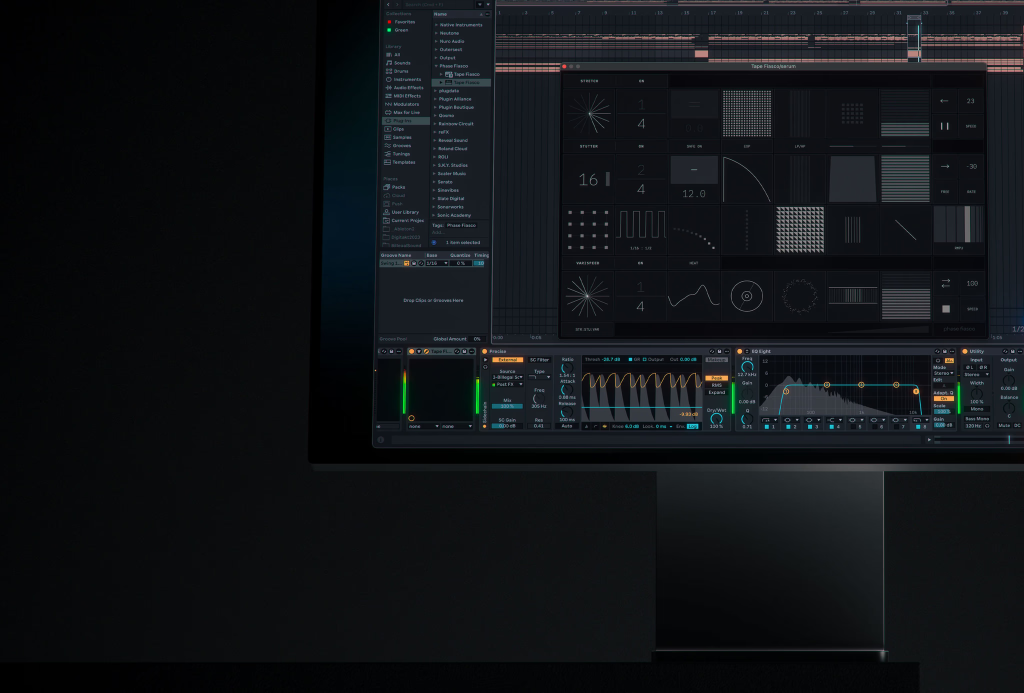
Jonas Eriksson has released Tape Fiasco, a free creative audio effect plugin that combines three time-based processors: Stretch (granular time-stretching), Varispeed (tape-style speed manipulation), and Stutter (rhythmic slicing and repetition). Each section can run on its own or in combination, with configurable signal routing. The plugin is designed for real-time performance and sound design, with tempo-synced operation, an envelope follower for modulation, and detailed parameter control per section.
Stretch (granular time-stretching)
- Independent control of speed and pitch via a grain buffer with overlapping playback.
- Speed ranges from frozen playback to normal speed without pitch change; tempo sets capture frequency for the grain buffer.
- Pitch shifts independently of speed using grain-rate adjustment.
- Grain controls balance smoothness versus transient clarity; Spread alternates grains left/right for stereo width.
- Scatter randomizes read positions for glitch textures; Reverse flips grain playback; Freeze holds the current buffer.
- Envelope follower can target Speed, Tempo, Pitch, Grain, Spread, Scatter, or Mix.
Stutter (rhythmic slicing and repetition)
- Rate operates tempo-synced (note divisions) or free (milliseconds); Capture sets how often new slices are recorded.
- Pitch shifts per repeat with optional Pitch Ramp for cumulative rises/falls.
- Gate and Gate Curve (Linear/Log/Exp) shape decay; Smooth sets crossfade at loop points.
- Pan alternates repeats across stereo; Mix blends dry/wet.
- Link mode offers predefined Rate:Capture combinations to avoid unstable settings in sync mode.
- Probability sets trigger chance; Retrigger can capture new audio mid-cycle for variation.
- Pattern options include Even, Dotted, Triplet, Swing, Ramp Up, and Ramp Down.
- Filter modes: LP/HP with Resonance (A) and Drive (B); Formant with Q/Resonance (A) and Formant Shift (B); Comb with Feedback (A) and Damping (B).
- Reverse plays slices backward while keeping overall timing.
- Envelope follower can target Rate, Capture, Pitch, Gate, Pan, Smooth, Mix, Ramp, Decay, Probability, Retrigger, or Filter.
Varispeed (tape-style speed and character)
- Speed controls tape playback from stop to normal; lower values produce pitch-down slowdowns.
- Tempo sets how often a new buffer is captured.
- Wow/Flutter adds dual-LFO pitch modulation for transport irregularities.
- Scratch provides real-time pitch bend with a spring-back to center.
- Saturation/Bitcrush adds distortion: Heat (tape-like saturation with soft-knee compression) and Bitcrush (bit reduction).
- Compression increases ratio and makeup gain on the Varispeed output; Mix blends dry/wet.
- Play Direction options: Forward, Forward/Reverse alternating per capture, or continuous Reverse.
- Stop simulates a tape stop and spin-up when released.
- Envelope follower can target Speed, Tempo, Wow/Flutter, Scratch, Saturation, Compression, or Mix.
Routing, sync, and performance
- Sections can be reordered via configurable signal paths to combine Stretch, Stutter, and Varispeed in series.
- Tempo-sync is available across sections for host-locked timing.
- Envelope follower per section with assignable destinations enables input-responsive modulation.
Formats and compatibility
- macOS: Apple Silicon only at release, in VST3 and AU formats. Intel build is planned.
- Windows: VST3 build provided but not tested.
- Tested in Ableton Live 12.2 on macOS Sequoia 15.1.
- The plugin is distributed as a free download.
Thanks for reading. We hope you found some cool and useful new tools!
Check out previous FREE Plugins Reports for even more freebies! You can also browse a range of free effects, free instruments, and free studio tools available from our partner Plugin Boutique, so check those out too. For everything else you can find lots of audio plugin deals on this website.