

Every few weeks we will let you know about the latest free audio plugins. Check those expiry dates because some won’t be free forever. Join the Plugin Deals and Freebies Facebook Group, or check out r/newplugindeals and r/freeaudioplugins on Reddit if you want to find out about the latest deals and freebies as they happen.
Quantum DSP Offers Metal Mayhem Volume Two Hybrid IR Library Free Normally Fifteen Dollars
Expiry: September 25th
Quantum DSP has released Metal Mayhem Vol. 2, a collection of 35 hybrid impulse responses designed for modern metal guitar production. The library is available as a free download for two weeks; the regular price is $15.
The set targets low tunings and extended-range instruments, supporting 6-, 7-, and 8-string guitars. The captures are voiced to keep low frequencies controlled under high gain, maintain midrange definition in dense rhythm layers, and preserve high-frequency articulation for fast picking and lead work.
Files are delivered as 24-bit/48 kHz WAV impulse responses and load directly into standard IR loaders. They are compatible with amp simulation plugins, hardware modeling pedalboards, and reactive load boxes used with tube amplifiers. No proprietary software or library management is required; users can drop the files into an existing signal chain.
The library consists of pre-blended cabinet captures created with phase-accurate digital modeling. The approach is intended to streamline setup for tracking, reamping, and mixing, while supporting note separation and transient clarity at high gain levels.
- 35 hybrid cabinet impulse responses for contemporary metal tones
- Voiced for low tunings on 6-, 7-, and 8-string guitars
- Controlled low end under heavy distortion
- Defined midrange aimed at maintaining separation in layered rhythms
- Smooth high-frequency response to retain attack without excessive fizz
- Phase-accurate digital modeling used for the captures
- 24-bit/48 kHz WAV format
- Works with most software IR loaders and amp sim plugins
- Compatible with hardware modelers and reactive load boxes
- No additional setup or mic placement required
Metal Mayhem Vol. 2 is positioned for producers and guitarists working with extreme gain settings who need cabinet responses that integrate quickly into a DAW or hardware-based rig. The focus on extended-range guitars and dense arrangements addresses common issues such as low-end buildup and loss of articulation in fast passages.
Joe Landers releases Profligacy free Windows and Mac synth plugin emulating Korg Prophecy
Expiry: None
Developer Joe Landers has released Profligacy, a free software synthesizer plugin for Windows and macOS that emulates the Korg Prophecy by running the original firmware. The project is unaffiliated with Korg.
Profligacy is a low-level emulation of the Prophecy’s hardware. Users must supply their own ROM dumps of the original firmware. On first launch, the plugin prompts for a folder containing korgprop/ic12_v17.bin and korgprop/ic22_v17.bin, or a korgprop.zip archive with those two files. The developer does not provide firmware and cannot assist in obtaining it.
The emulation models the Prophecy’s main chips: an NEC V55PI microcontroller, a Hitachi H8/3003, and three TI TMS57002 DSPs. Inter-chip UART and DSP host interface signals were probed and matched in time and content to hardware behavior, tracing a path from MIDI input through the UART and host interface to digital audio output.
To assess audio accuracy with free-running oscillators, long sustaining waveforms from the emulator and hardware were phase-aligned and compared. While not sample-exact, observed differences between hardware units were consistent with hardware-to-emulator differences. For DSP2 (filters) and DSP3 (effects), inputs and outputs of the hardware were recorded across four channels, then the same inputs were run through the emulator to ensure matching outputs. The original firmware’s DSP programs were also executed on a standalone DSP board to control oscillator phase during verification.
The post-DAC analog stage is not modeled. According to the service documentation, the intended frequency response is flat within 1 dB across the audible band.
The firmware’s DSP code consists of programs up to 256 24-bit instructions. Observed loading behavior includes 12 programs to DSP1 for oscillator sets, one program to DSP2 for filters, two programs to DSP3 for effects, and a housekeeping program that clears memory and state between program loads.
Processor roles mirror the hardware. The V55PI handles keys, switches, the LCD, and MIDI, communicating with the H8/3003 over a bidirectional UART (31.25 kbit/s one way and 32 kbit/s the other). The H8 converts program, parameter, and note events into host-interface control for the DSPs. Program changes use PLOAD messages to send new DSP programs to DSP1 and DSP3 (DSP2 is typically loaded at boot). Performance controls send CLOAD messages to update coefficients for triggers, pitch, amplitude, filter settings, and envelope/LFO timing and shapes.
The core of the project is a cycle-accurate TMS57002 emulation. After validating instruction behavior, rounding, overflow, and mode-dependent details with physical chips, the emulator ran the original DSP programs with long-run stability checks designed to reveal low-bit errors that could surface only after millions of frames.
Performance optimizations include a dynamic recompilation/JIT mode for the DSP core. In testing, the plugin used roughly half a CPU core on an Apple M2 and about 80% on an Intel iMac, with scope for further improvements.
The user interface began as a parameter-dense editor and was refined to streamline access to the Prophecy’s controls within a plugin workflow.
Supported systems include macOS on ARM and Intel processors. A macOS x64 release is not currently being built. Windows x64 has been tested by early users.
Profligacy runs the original Prophecy firmware to reproduce the instrument’s oscillator, filter, and effects behavior in a plugin environment, enabling control via MIDI and integration with modern DAWs, provided the user supplies the required ROM files.
The project’s source code is released under the GNU Affero General Public License, version 3 only. Third-party notices accompany the distribution.
Image Line adds Antares AutoTune Go vocal pitch plugin to FL Cloud free tier
Expiry: None
Image Line has added AutoTune Go, a vocal pitch plugin, to the FL Cloud free tier. Developed with Antares, it is the first plugin created specifically for FL Cloud and is available at no additional cost to FL Studio users through FL Cloud Free.
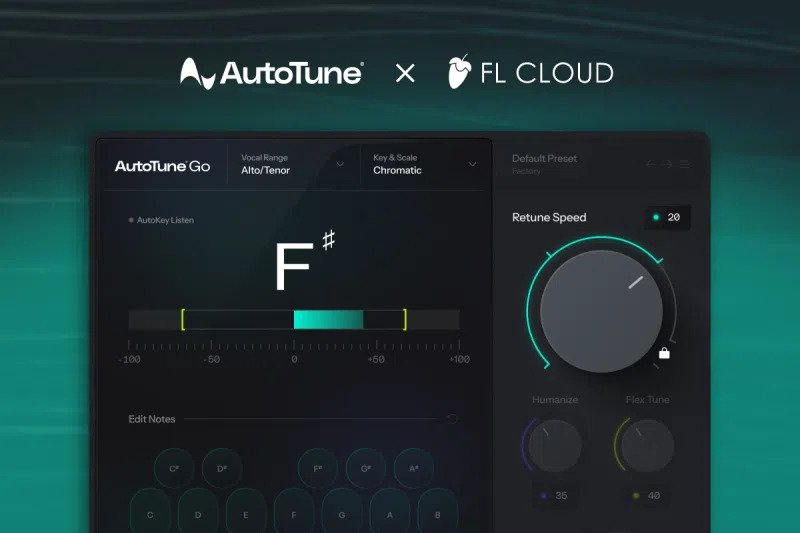
AutoTune Go is a vocal pitch correction tool designed for fast, flexible tuning inside FL Studio. It includes a real-time visual pitch display, automatic vocal range detection, key and scale selection, and four Retune Speed options.
The Retune Speed settings cover a range from subtle, more natural correction to faster, tighter tuning, allowing adjustment for different vocal styles and performances.
- Retune Speed: Four selectable settings for the intensity of pitch correction.
- Key and scale: Lock vocals to Major, Minor, or Chromatic scales.
- Vocal range: Set manually or use Auto Detect to identify the range automatically.
To install AutoTune Go in FL Studio: open the application, go to Tools > Manage Cloud Plugins, search for “AutoTune Go” or locate it in the list, then select Install. The plugin runs directly inside FL Studio once added from FL Cloud.
Ample Sound releases free Ample Bass P Lite 4 virtual bass instrument for Mac and Windows
Expiry: None
Ample Sound has released Ample Bass P Lite 4, a free virtual bass instrument for macOS and Windows.
Modeled on a classic Fender Precision Bass, ABP Lite 4 provides a fingerstyle library recorded at 16-bit with a 560 MB footprint. The playable range spans D1 to F4, with drop tuning supported down to D1. Articulations include sustain, hammer-on and pull-off, legato slide, palm mute, and accent. A polyphonic legato engine and Slide Smoother handle interval transitions at varying speeds.
The instrument runs as a VST2, VST3, AU, and AAX plug-in, and as a standalone application.
Riffer 4 MIDI editor
- MIDI editor tailored for plucked string instruments.
- Dual view modes with real-time switching between Piano Roll and Guitar Tab.
- String visualization in the Piano Roll enforces realistic string behavior, avoids same-string polyphony, and assigns fingering intelligently.
- Full MIDI import/export with consistent playback between Riffer and DAW tracks.
- Technique editing for fingering, articulation, legato, and expression without relying on key switches or complex CC programming.
- Velocity and multi-lane MIDI CC editors with color-coded lanes and one-click CC curve presets.
- Riff library with hundreds of bass patterns.
Tab Reader 4
- Imports Guitar Pro files from GP3 through GP8.
- Imports full bass tracks into Riffer with fingering, articulations, and performance data preserved.
- Files created by third-party tab editors not affiliated with Guitar Pro are not supported.
Amp and effects
ABP Lite 4 includes an amp and cabinet simulation and onboard effects: 8-band EQ, compressor, delay, and convolution reverb.
ABP vs. ABP Lite
- Size: ABP 5.2 GB (24-bit); ABP Lite 560 MB (16-bit).
- Library content: ABP includes fingerstyle and pick; ABP Lite includes Fingerstyle 1.
- Range: ABP B0–F4; ABP Lite D1–F4 (standard 4-string range).
- Sampling method: ABP sampled individually at every string and fret; ABP Lite sampled by pitch with shared samples across string positions.
- Riffer: ABP includes the full content library; ABP Lite offers full editing with a limited preset library and a 64-measure limit.
- Amp models: ABP includes three amp models; ABP Lite includes one.
- Articulations: ABP adds slide in/out, pop, slap, tap, staccato, and natural harmonics beyond the Lite set.
System requirements
- macOS 10.15 or later; Windows 7–11 (64-bit).
- Plug-in formats: VST2, VST3, AU, AAX; standalone application included.
- CPU: Intel Core i5, AMD Ryzen 5, Apple Silicon M1, or higher.
- Disk: Over 10 GB. The sample library must be installed on an internal drive or an external SSD via USB 3.0 or faster, USB4, or Thunderbolt.
TONE3000 releases free official Neural Amp Modeler plugin for Windows Mac and Linux for guitar and bass
Expiry: None
TONE3000 has released a free, official Neural Amp Modeler (NAM) plugin for guitar and bass on macOS, Windows, and Linux. The software runs as a plugin inside a DAW or as a standalone application.
The plugin integrates browsing and playback of NAM captures and impulse responses (IRs) directly inside the interface. Users can select tones without managing external files, drawing from a large library of community-made captures that includes amps, pedals, cabinets, full rigs, outboard gear, and acoustic spaces.
TONE3000’s plugin is built on NAM A2, the latest generation of Neural Amp Modeler developed in partnership with Steve Atkinson. The technology focuses on producing detailed digital models of analog signal chains using machine learning.
Key features include:
- Plugin formats: VST3, AU, AAX, LV2, and CLAP, plus a standalone app.
- Platform support: macOS, Windows, and Linux, with x64 and ARM64 options where applicable.
- Signal chain building: stack unlimited blocks and create branching or dual chains.
- Stereo workflow: stereo input, stereo widener, multi-core stereo processing, auto-align, and auto-balance.
- Processing tools: calibration, normalization, oversampling, global EQ, and both pre- and post-block parametric EQ.
- Control and utility: MIDI mapping throughout and a built-in tuner.
The plugin is designed for both studio and live scenarios. In a DAW, it can be used for tracking and production with standard plugin formats. As a standalone app, it allows direct guitar or bass input with tone selection for practice or performance without a DAW.
Captures within the library cover a broad range of sources, from traditional guitar and bass amplifiers and speaker cabinets to pedals, studio processors, and various acoustic environments. Users can construct complex chains—for example, placing drive stages before preamps or experimenting with parallel branches—without limits on the number of blocks.
For stereo setups, the plugin provides tools for widening and alignment, along with processing designed to distribute workload across cores. Global and per-block EQ options support tone shaping at different points in the chain.
The project is open source. Developers can review the codebase, report issues, request features, and contribute improvements through standard open-source workflows.
Polarity Music releases free Polarity Recorder for background audio on Mac Windows and Linux
Expiry: None
Polarity Music has released Polarity-Recorder, a free audio utility for macOS, Windows, and Linux. Version 0.2.2 adds desktop audio capture in the standalone application and includes compatibility and stability fixes for audio devices, older x86_64 CPUs, and macOS CLAP hosts. The page was updated on 2026-09-12.
The tool records continuously and keeps the most recent 1, 2, 5, 10, or 20 minutes in a ring buffer. Users can capture a plug-in input or full system output in the standalone app, then select, edit, audition, and export to WAV. A record hold function pauses changes to the buffer when needed.
Desktop audio capture is available in the standalone app on Windows, macOS, and Linux. When enabled, the recorder automatically mutes its own output to prevent feedback. Capture-source selection is available from the standalone menus and the command line.
Polarity-Recorder is provided as a standalone application and as plug-ins in CLAP, VST3, and LV2 formats, with AUv2 available on macOS. Platform packages target Windows x86_64, macOS Universal, and Linux x86_64. Operation supports mono and stereo buses with transparent passthrough when audition is off.
The history view supports inspection while recording. Hovering over the source pane holds the displayed viewport so users can examine a section without losing their place; leaving the pane returns the view to live history. An optional frequency color mode tints low frequencies red, mids teal, and highs pale blue; it is off by default to keep timeline markers prominent.
For musical workflows, the history shows sample-aligned transport, bar, and beat markers. Selection edges snap to bar and beat boundaries, and near-exact bar selections are corrected to help prevent loop drift. Holding a modifier key allows free movement without snapping.
The editor provides a musical grid with bars, quarter notes, eighth notes, and sixteenth notes, depending on zoom. It can follow the host tempo and meter or use manually set BPM and meter. A time-based grid in seconds is also available.
Editing uses a two-stage approach. Users select audio from the current history, preview it in a lower waveform, and then copy the selection into an owned editor clip before applying destructive edits. This keeps the live history intact until the edit is confirmed.
Available edit operations include copy, cut, paste, silence, delete, crop, reverse, trim, rotate, and wrap. Fades can be added, gain can be adjusted, and normalization is available to peak or integrated LUFS, with an optional hard clip on the result. All destructive edits support undo and redo via controls or standard shortcuts; exported files and clipboard-only actions are not added to the edit history.
Auditioning supports a user-placed start marker and optional looping. A sync option starts playback from the same marker when the host begins transport. Users can import external mono or stereo WAV files into the editor; the source path is retained, and replacing the original file requires confirmation.
Exports produce WAV files. On Windows and macOS, users can also drag a selection directly to a compatible DAW, plug-in, or file manager; on Linux, the Save function is used. Clip metadata set in the editor—such as project, sample type, form, BPM, key, scale, and take—can be embedded into structured filenames for clearer organization.
A clip browser enables search across titles and structured metadata, with options to preview, drag, load, rename, or delete exported WAV files. The editor clip and its naming metadata persist after the UI is closed and reopened. Recorded audio is not embedded in the DAW project state.
The audio engine is designed for real-time safety. The audio thread avoids memory allocation, locks, logging, and file access; other tasks run on a background lane.
Each operating system package includes the available plug-in formats and a standalone app. Windows provides an installer for CLAP, VST3, LV2, and standalone; macOS provides a universal installer with AUv2, CLAP, VST3, LV2, and standalone; Linux provides an archive with CLAP, VST3, LV2, and standalone.
Availability: free download. No account is required. Source code is not publicly available.
Parish Audio Offers Stereo Control Free For A Limited Time
Expiry: Unknown
Parish Audio is offering its product Stereo Control as a free download for a limited time.
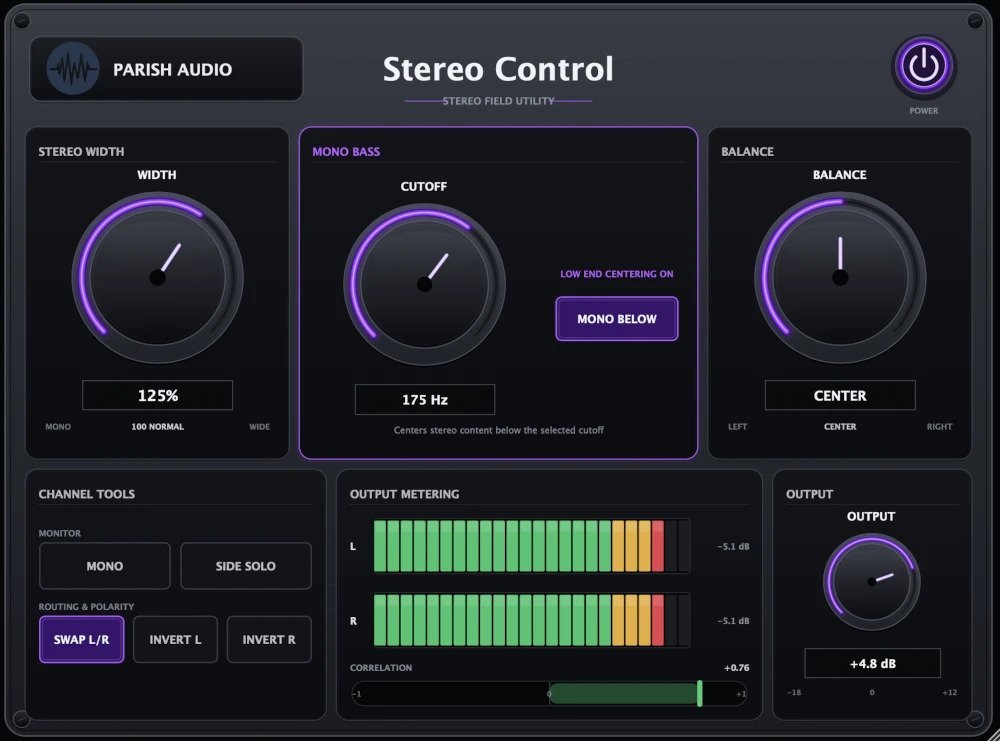
The product page provided for verification displayed only a JavaScript requirement notice and did not include static content. As a result, detailed information about the software’s features, system requirements, plugin formats, supported operating systems, version number, or typical price could not be confirmed at publication time.
No end date for the promotion was visible in the materials reviewed. Information about download procedures, account requirements, or licensing/activation methods was also not available.
This notice reflects the extent of details accessible from the provided page. Additional specifics will be reported if a static snapshot or fully rendered page becomes available.
Thanks for reading. We hope you found some cool and useful new tools!
Check out previous FREE Plugins Reports for even more freebies! You can also browse a range of free effects, free instruments, and free studio tools available from our partner Plugin Boutique, so check those out too. For everything else you can find lots of audio plugin deals on this website.